Architecture Overview
kubenest is a distributed system with five cooperating components. Each component has a single, well-bounded responsibility, and the boundaries between them are deliberately strict. This page explains what each component does, how they communicate, and why the system is designed the way it is.
Understanding the architecture pays off quickly: it tells you where to look when a deployment stalls, why certain operations are async, and exactly what the control plane can and cannot reach inside your cluster.
The five components
kubenest-backend
The backend is the control plane. It is a FastAPI application that owns every user-facing resource: organizations, users, clusters, projects, apps, stack templates, addon instances, and deployment history. All persistent state lives in PostgreSQL. Redis handles job queues, rate-limit counters, and short-lived cache entries (including chart inspection results).
Application, addon and component-secret operations are dispatched as schema-validated JSON events to the hub and acknowledged asynchronously, rather than executed against your cluster from inside the backend. The control plane sends intents through the hub and reads what happened from the status events the operators send back. No request state is held in memory between calls, so you can run multiple replicas behind a load balancer without any shared in-process state.
kubenest-hub
The hub is a Go WebSocket message broker. Its sole job is routing events between the backend and the operators running on each cluster. The backend connects to the hub as a persistent WebSocket client (identified by a client_type: "backend" claim in its JWT). Each operator also connects as a persistent client (authenticated by a cluster-scoped JWT). The hub maintains a connection registry in Redis so that multiple hub replicas can be deployed without routing failures.
The hub understands two event directions: command events flow backend → operator (deploy, patch, delete, redeploy); status events flow operator → backend (phase transitions, health checks, drift reports, log lines). The hub does not inspect or transform event payloads — it validates the sender’s identity and routes the message to the correct recipient session.
kubenest-operator
The operator is a Go controller-runtime application that runs inside each registered Kubernetes cluster. It implements five Kubernetes controllers:
- StackDeploy controller — watches
StackDeployCRDs (the cluster-side representation of an App) and drives the full deploy/patch/delete reconcile loop. - Workload controller — tracks individual workload components within a StackDeploy: watches the Argo CD Application’s health, reports the cluster’s ingress IP, and collects exports once a component is running. The operator creates that Application on its own cluster. See GitOps.
- Addon controller — same as Workload but for Helm-chart backing services; also handles export discovery after a successful install.
- BuildRequest controller — manages image build jobs (Kaniko or Cloud Native Buildpacks) for Dockerfile and buildpack deployment modes.
- Project controller — ensures the Kubernetes namespace exists and synchronizes an optional project registry secret before any app is deployed into it. It does not manage resource quotas or RBAC bindings.
There is exactly one operator instance per cluster. The operator has local Kubernetes API access and uses that access exclusively — it never routes Kubernetes calls through the hub or the backend.
kubenest-ui
The web console is a Next.js application. It communicates with the backend over REST for all CRUD operations (creating apps, listing clusters, reading deployment history). Real-time status — phase changes, ArgoCD sync progress, log streams — arrives via a Server-Sent Events subscription to the backend’s /api/v1/events/stream endpoint. The UI never connects directly to the hub or to the operator; it sees only what the backend surfaces.
kubenest-contracts
The contracts repository is not a running service — it is the shared source of truth for the JSON Schema definitions of every event that flows through the system. Command events and status events are validated against these schemas at the hub boundary: the hub rejects any malformed event before routing it. This guarantees that the operator never receives a structurally invalid command, and the backend never receives a structurally invalid status update.
System topology
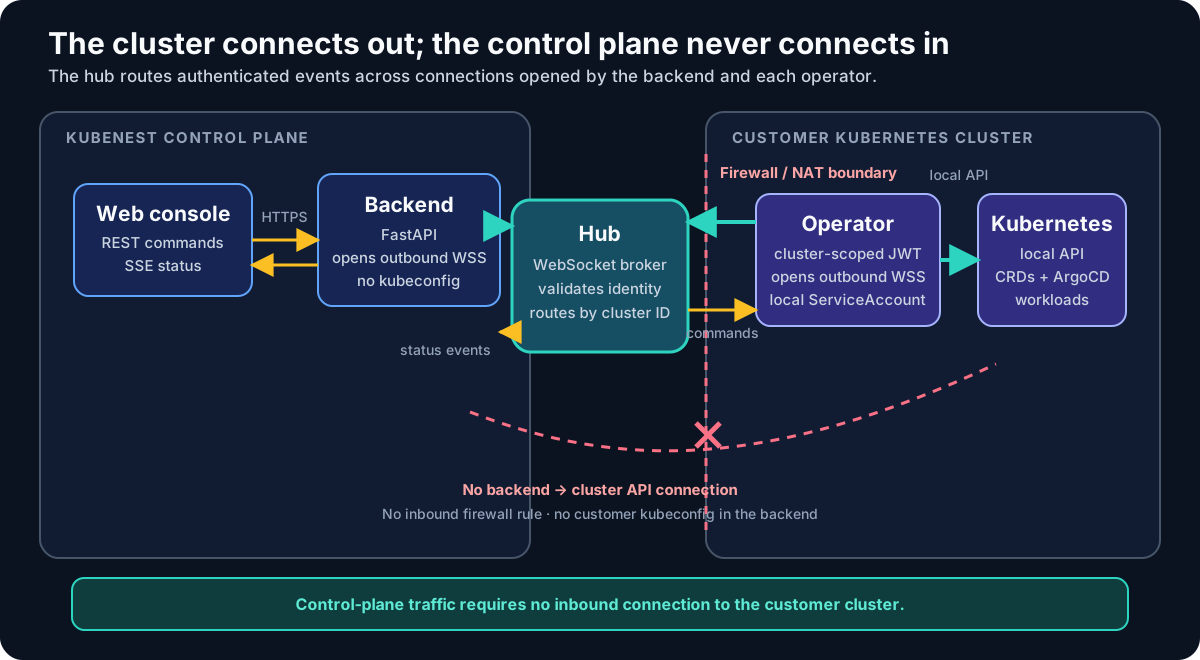
The data flow for the two main directions:
Three core design principles
1. Cluster access
Most Kubernetes work originates inside the target cluster. The agent holds the local API access and acts on schema-validated events routed through the hub, and for application, addon and component-secret operations the control plane builds no Kubernetes client for your cluster at all.
Every workload Argo CD Application is created by the operator on its own cluster. The backend records the intent and dispatches it as an event; the operator on the target cluster turns that intent into the Application and reports status back through the hub. A stack’s components all run on the stack’s cluster.
The agent’s own session requires no inbound firewall rule. The operator dials the hub outbound over WebSocket and holds the connection open, so it survives NAT and a restrictive corporate firewall as long as outbound HTTPS/WSS is allowed.
2. ArgoCD reconciles everything; Git backs the addons
Nothing in kubenest applies Kubernetes resources with kubectl apply. ArgoCD does the applying, in
both paths. Where the two paths differ is where the desired state lives, and the difference is worth
knowing before you go looking for a commit that was never made.
Addons are backed by Git. The addon controller writes the chart and values to a per-cluster
GitOps repository under clusters/{id}/addons/, then points an ArgoCD Application at that
directory. An addon therefore has a human-readable representation in Git that you can inspect, diff
and revert independently of kubenest, and ArgoCD keeps serving it if kubenest is offline.
Workloads are not. The operator creates the Argo CD Application on the cluster it runs in, with the Helm values inline in the Application spec against a chart repository. No workload manifest is committed, and there is no workload directory in the GitOps repo. A workload’s change history lives in the backend’s deployment records rather than in Git.
GitOps has the full comparison, including what this costs you.
3. Event-driven asynchrony for all cluster operations
Cluster operations are long-running and unreliable — network partitions, slow image pulls, failing readiness probes. kubenest models all of them as asynchronous events rather than synchronous RPC. When you POST an App create request, the backend records the intent and immediately returns a Pending response. The operator reconciles on its own schedule and emits status events as it makes progress. The UI reflects those events in real time through the SSE stream.
This architecture eliminates HTTP timeouts from the critical path and makes the system resilient to transient connectivity failures between the backend and the hub, or between the hub and the operator.
Command delivery guarantee
The hub is a router, not a durable command queue. A backend write that needs an operator command must use one of two contracts:
- Durable intent. Persist the complete desired state before dispatching,
return
PendingorAccepted, and keep deriving the command until a matching operator observation confirms the cluster state. If confirmation is delayed, the reader exposes a named degraded lifecycle reason while reconciliation continues. - Fail closed. If an operation has no durable state that can be reconciled, dispatch without relying on the client-side queue and return a non-2xx response when the hub cannot confirm the route.
A socket write, a connected preflight, or admission to a temporary client queue never proves that a cluster changed. A hub route confirmation only proves routing; the operator’s status observation is what confirms cluster state.
Request flow patterns
Synchronous operations
Some operations complete entirely within the backend and return a result immediately. These are pure metadata operations that do not touch Kubernetes.
Examples: creating a project record, listing clusters, reading deployment history, fetching a stack template.
Asynchronous cluster operations
Operations that change Kubernetes state are asynchronous. The backend dispatches a command event and immediately returns; the operator reconciles and streams status back.
Status update loop
The operator runs a continuous reconcile loop. Whenever ArgoCD reports a sync or health change, the operator emits a status event that propagates all the way to the UI:
Security architecture
User authentication
Users authenticate with a username/password POST to /api/v1/login. The backend issues two tokens:
- Access token — a short-lived JWT (30-minute expiry) sent in the response body. Clients include it in the
Authorization: Bearerheader on every request. - Refresh token — a 7-day JWT stored in an
HttpOnly,Secure,SameSite=Strictcookie. Clients callPOST /api/v1/refreshto get a new access token when the current one expires. Because the refresh token is in an HttpOnly cookie, JavaScript cannot read it, mitigating XSS-based token theft.
Access tokens are validated on every request by the backend’s FastAPI dependency injection layer. There is no token introspection call to an external service — the backend validates the signature locally using the shared secret.
Operator authentication
When a cluster is registered, the backend mints a cluster JWT — a long-lived token scoped to that cluster’s UUID. This token is embedded in the Kubernetes Secret created by the operator Helm chart. The operator presents it to the hub in the Authorization: Bearer header when establishing its WebSocket connection.
The hub validates the cluster JWT (signature + cluster_id claim), then checks the token’s token_version claim against the cluster’s revocation floor — the lowest version the hub still admits. A token below the floor is refused, and a rotation also closes the cluster’s live session rather than waiting for it to reconnect. Once admitted, the session is associated with that cluster ID and subsequent events from it are authoritative for that cluster — the backend trusts hub-routed status events without re-validating the operator’s identity on each message.
The floors are pushed to the hub by the backend and held in the hub’s memory. A hub that has restarted and has not yet received them, or whose copy has gone stale, refuses every operator connection with a retryable 503 until the control plane reconnects. That is deliberate: a hub restart is predictable, so admitting operators unverified for a window after one would make the window selectable. Existing connections are not dropped and workloads on the cluster are unaffected — this is a control-plane pause, not an outage on your cluster.
The cluster JWT is long-lived and has significant privilege. Treat it like an SSH private key: store it in a Kubernetes Secret (the Helm chart does this automatically), restrict access to that Secret via RBAC, and revoke it immediately if you believe it was compromised.
Revoke with POST /clusters/{id}/rotate-token — see the API reference. It is the only call that raises the revocation floor, and every token previously issued for that cluster stops working the moment it returns.
It is not a hygiene operation. The new token reaches the agent through the operator chart’s values, so the cluster stays disconnected until you run an install or upgrade carrying it. Rotating a fleet on a schedule would disconnect the fleet. Re-running kubenest platform install is not a revocation: it issues a higher-versioned token and deliberately leaves the floor where it is, so re-running an install cannot lock a healthy cluster out of its own hub.
Backend-to-hub authentication
The backend authenticates to the hub using a JWT with a client_type: "backend" claim. This is distinct from cluster JWTs and from user access tokens. The hub uses the client_type claim to apply different routing rules: messages from the backend session are forwarded to operator sessions, and vice versa.
Network boundaries
| Connection | Protocol | Authentication |
|---|---|---|
| UI → Backend | HTTPS REST / SSE | User access token (Bearer) |
| Backend → Hub | WSS (persistent) | Backend JWT (client_type: backend) |
| Operator → Hub | WSS (persistent) | Cluster JWT |
| Operator → Kubernetes API | In-cluster HTTP | ServiceAccount token (RBAC-scoped) |
| Operator → Git | HTTPS | Personal access token (read/write on GitOps repo only) |
| ArgoCD → Git | HTTPS | Same GitOps PAT |
| ArgoCD → Kubernetes API | In-cluster | ArgoCD ServiceAccount |
Multi-tenancy model
kubenest enforces isolation at four levels, each reinforcing the others.
Organization level (backend). Every database row carrying user data has an org_id foreign key. All API queries include WHERE org_id = <current_org> — organization A cannot read organization B’s data regardless of how the query is constructed. Backend middleware enforces this before any route handler runs.
Cluster level (routing). A cluster’s operator session in the hub is keyed by cluster_id. The backend can only dispatch events to clusters that belong to the authenticated user’s organization. The hub enforces this routing — you cannot send a command event to a cluster you do not own by constructing a crafted WebSocket message, because the hub validates the sender’s org_id claim against the target cluster’s registration.
Project level (Kubernetes). Each project maps to a Kubernetes namespace. The operator creates that namespace before deploying any application into it. Namespace scoping keeps objects in project A separate from project B; KubeNest does not currently manage resource quotas or RBAC bindings for those namespaces.
Namespace boundary (operator). The operator’s Project controller enforces namespace boundaries on all reconcile operations. A StackDeploy that specifies a target namespace outside its registered project is rejected by the operator with a validation error that propagates back through the hub to the backend.
GitOps
ArgoCD is the common reconciliation layer. Git is the source of truth for addons, and not for workloads — a distinction worth knowing before you go looking for something in the wrong place.
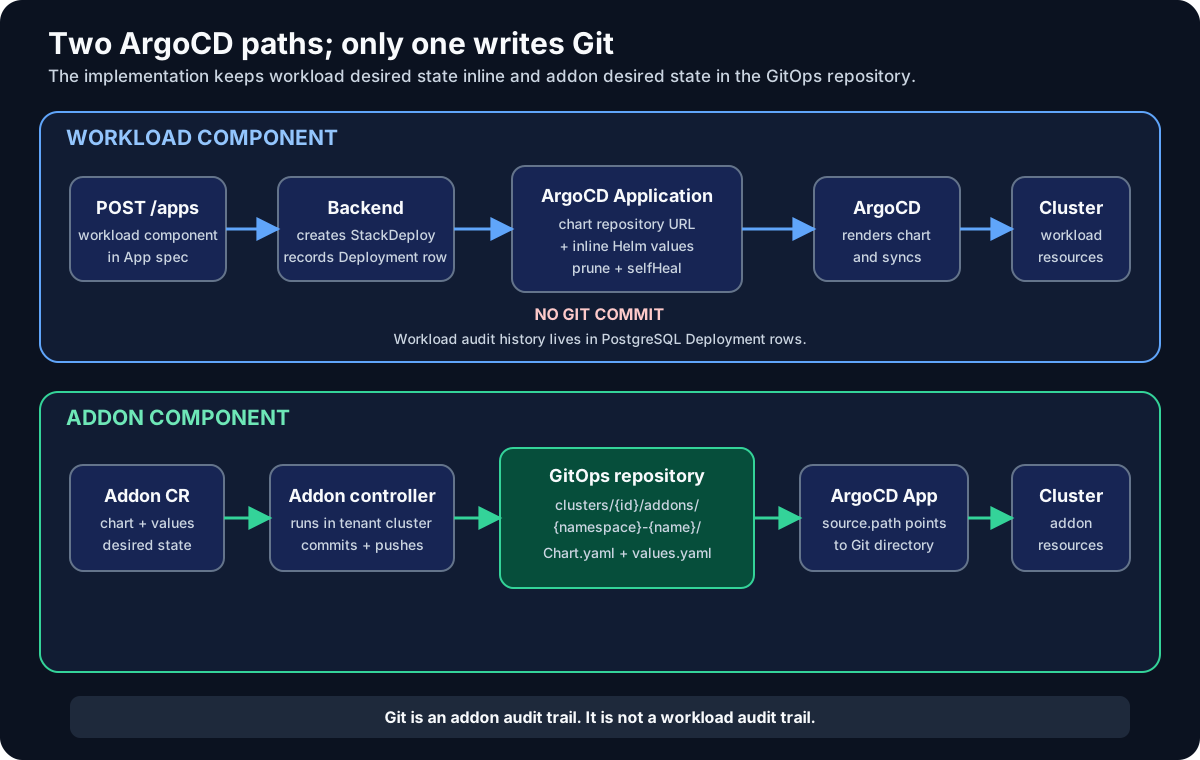
Workload history lives in PostgreSQL. Every App operation is a Deployment row, and the ones
that support rollback store the prior StackDeploy snapshot alongside. Workload ArgoCD
Applications carry inline Helm values, so a git log is not the audit trail for a workload deploy,
patch or rollback — the API is.
Addon history lives in Git. Each addon reconciliation writes Chart.yaml and values.yaml
under the cluster’s addon directory and commits:
gitops-repo/
└── clusters/
    └── {cluster-id}/
        └── addons/
            └── {namespace}-{addon-name}/
                ├── Chart.yaml
                └── values.yaml
Either way ArgoCD self-heals against its desired state, prunes what should not be there, and reports sync and health back.
Drift detection
Drift is live Kubernetes resources diverging from desired state. ArgoCD reports Application sync and health; the Workload controller separately compares the desired image and replica count against the observed Deployment, and the StackDeploy controller aggregates its children.
The API exposes it as sync on the App:
{
  "phase": "Running",
  "sync": {
    "driftDetected": true,
    "driftClass": "recoverable",
    "driftDetails": [
      { "resource": "Deployment/my-app-web", "field": "spec.replicas", "desired": 2, "observed": 1 }
    ]
  }
}
Two classes, distinguished by what they do to your next operation:
recoverable— ArgoCD can re-apply the desired resources itself, and does.blocked_sync— the Application isUnknown,ErrororDegraded. Mutating routes return409until the underlying condition is resolved, rather than layering another change on top of a cluster that is not converging.
Treat workload ArgoCD Applications and addon Git directories as KubeNest-managed desired state. Direct edits can be overwritten by the next API operation or controller reconciliation.
See also:
- Connect a cluster — why existing clusters are not supported yet
- Concepts — the object model these components reconcile
- Deploying apps — the API these paths serve